JMJ Project

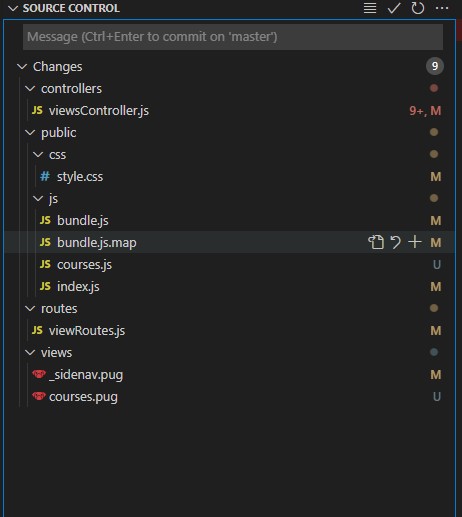
Adding a new page

  1. viewsController.js
    • get request parameters
    • search the database
    • render the appropriate page with the data
  2. viewRoutes.js
    • add the route with appropriate params, and associate it with the controller from views controller
  3. _sideNav.pug
    • add a link on the side name
  4. <new page>.pug
    • create the new page (but try it out in sass first)
  5. index.js in PUBLIC
    • initalize form
    • set up event listeners
  6. <new page>.js ( in PUBLIC)
    • event listeners for clicking, updating, etc in form
  7. bundle.js
    • run this script (or watch if local), however, need the new bundle for upload
  8. bundle.js.map (from build in JMJ)
  9. style.css (copies from JMJ card Sass project)

Add new user – notes

  1. firstname, lastname, email, cellphone all required, plus permissions
    • add a new user, error – probably no family id, or teacher id for that matter
    • new user not showing up ? no family info, see how selection to get add users is done
  2. generate random password
  3. send email ‘login to site and choose the forgot password option’

Next Actions

  • Remove addresses
  • get rid of second parent through jmj site
  • Have only one user (parent)
  • Add a new user (email, permissions)
  • New user set up user info
  • New user set up family
    • add spouse – new user
    • add children
  • teacher
    • teachers page
      • link to edit teacher record
        • only bio needs to be edited
      • link to edit courses page
        • do this like children with modal
  • create virtual method on courses to populate an array with all grade levels between min and max
  • add stderr to error reporting

SASS work flow

  • get into JMJ cards project
  • start up “watch”
  • create a new section in the index.html file  <section class=”courses page__content”>
  • give it an overall class for referencing in javascript (select by class = courses, families, enrollments, etc
    • this gives the ability to check which page it is and attach appropriate event listeners, etc
  • create a new sass file for the section _courses.scss, _families.scss, etc
  • add the file into main (@import ‘families’; @import ‘courses’; ,etc
  • edit new scss file
  • incorporate new scss stuff into the html
  • use “go live” on the lower left to start up the page
  • make changes and observe what is happening on the golive page
  • once good , run build
  • copy the style.css to the JMJ Dev server project
  • convert the html to pug
  • add the pug to jmj Dev Server
.courses {
  padding: 2rem 5rem;
  display: flex;
  justify-content: center;
  flex-wrap: wrap;
  gap: 7rem;

  &__title{
    text-align: center;
  }

  .course_card{
    &__grades, &__semesters{
      display: flex;
      justify-content: left;
    }
  }

}

.year-selector {
  display: flex;
  justify-content: center;
}
 <section class="course page__content">
      <h1 class="courses__title">My Course</h1>
      <div class="year-selector">
        <select name="year-selector" id="yearSelector">
          <option value="2021-2022">2021-2022</option>
          <option value="2020-2021">2020-2021</option>
          <option value="2019-2020">2019-2020</option>
          <option value="2018-2019">2018-2019</option>
        </select>
      </div>